October 28, 2026 · 257 Views
Fortnite Cross-Platform Shared Wallet & Skin Pack Activation Guide: Darkest Grumblings & Chill Vibez Bundles
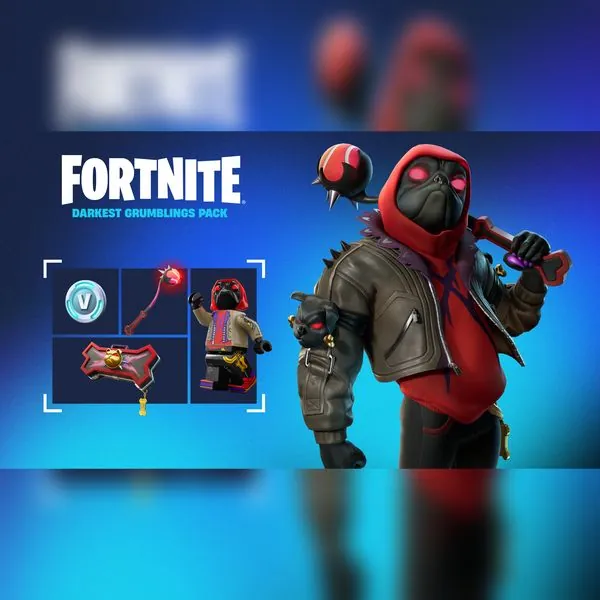
Featured in this Guide
Fortnite: Darkest Grumblings Pack + 600 V-Bucks (Global Top Up) – Dark Doggo Bundle
$14.99
Fortnite Shared Wallet & Skin Pack Activation Guide
Everything you need to know about activating Darkest Grumblings & Chill Vibez packs across PC, PlayStation, Xbox, and Switch.
Cosmetic starter packs in Fortnite—such as the fierce
Darkest Grumblings Pack (Dark Doggo Bundle)
and the aesthetic
Chill Vibez Pack (Reverie Bundle)—offer
tremendous value by bundling an exclusive character outfit, matching back bling, pickaxe, and 600 V-Bucks for a fraction of the cost.
1. How Epic Games “Shared Wallet” Works
Epic Games supports the Fortnite Shared Wallet across PlayStation, Xbox, PC (Epic Games Launcher), Cloud Gaming (Xbox Cloud / GeForce NOW), and Android mobile.
- V-Bucks Earned or Purchased: V-Bucks purchased on PC/Epic Games are accessible and spendable on PlayStation, Xbox, PC, and Mobile seamlessly.
- Locker Items & Skins: All outfits, emotes, gliders, wraps, and musical tracks sync instantly across every platform linked to your Epic Games account.
2. Safe Account Linking Checklist
Before ordering your Fortnite bundle or top-up, verify that your accounts are connected on
Epic Games Connected Accounts:
- Log in to your Epic Games account on browser.
- Go to Account Settings → Apps and Accounts.
- Ensure your PlayStation Network, Xbox Live, or Nintendo account is linked to the same Epic ID.
- Provide your Epic Games ID or temporary credentials in checkout for direct in-game pack delivery.
3. Top Fortnite Deals on HappyNoLimits
Fortnite: Darkest Grumblings PackDark Doggo outfit + pickaxe + 600 V-Bucks
Fortnite: Chill Vibez PackReverie skin + Dreamer back bling + 600 V-Bucks